BetterOff External API documentation version v1
https://api-lewisham.betteroff.org.uk/external/v1
Environments
Test/Production URLs
The URLs shown in this document indicate the API endpoints in the production environment. To access the API in a test environment instead, replace www with www2 or api with api2.
Example Production API URLs
https://lewisham.betteroff.org.uk/#/oauthhttps://api-lewisham.betteroff.org.uk/oauth/token
Equivalent Test Environment URLs
https://lewisham2.betteroff.org.uk/#/oauthhttps://api-lewisham-2.betteroff.org.uk/oauth/token
API Authentication
Introduction
To invoke the API endpoints, a client must first obtain an OAuth2 access token and submit this token with each API request. A client obtains an API token by authenticating with the BetterOff (BO) OAuth2 provider. Readers unfamiliar with OAuth2 should first read this short article - from the beginning until the end of the Web Server Apps section - to familiarize themselves with the concepts involved.
Client Registration
Applications wishing to use BO as an OAuth2 provider must register themselves specifying a client ID, secret and one or more redirect URIs. The purpose of these is explained below
- Client ID: uniquely identifies an OAuth2 client (analogous to a username)
- Client Secret: a secret shared by the client and BO that is used to authenticate the client (analogous to a password)
- Redirect URIs: during the OAuth2 authentication process an authorization code is sent from BO to the client. The redirect URI indicates the address (within the client) to which this code should be sent. Typically, one URL is registered for each client environment (staging, production, etc.)
Authenticating with OAuth2
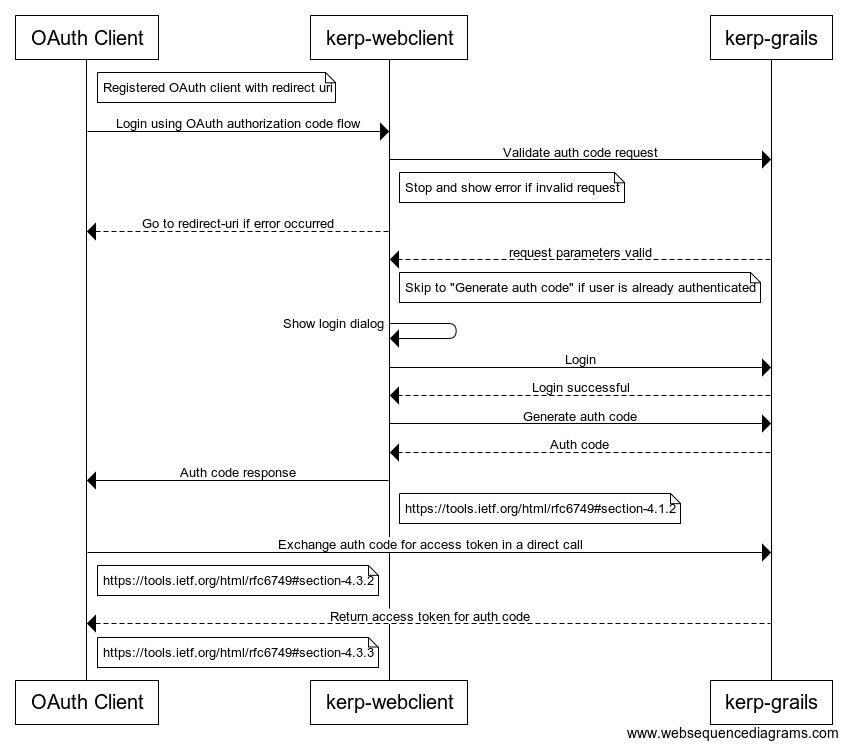
Authorization Code Request
To initiate the process, the user clicks on a link (or similar) in the client application that issues a HTTP GET request to the following URL
https://lewisham.betteroff.org.uk/#/oauth?response_type=code&client_id=${client_id}&scope=profile&redirect_uri=${redirect_uri}&state=${state}
The ${placeholders} shown in this URL should be replaced with these URL-encoded values
client_idthe identity assigned to this client during registrationredirect_urithe URI to which the authorization code will be send. This must match one of the redirect URIs specified during registrationstatethis parameter is recommended (but not mandatory) as it prevents cross-site request forgery vulnerabilities. The value of this parameter should be a pseudo-random unguessable value and it must be stored within the client application (the server-side session is often used).scopethis parameter defines the operations that a client can perform. If multiple scopes are requested, they should be spearated by a space. The available scopes areprofileread a user's profilesnapshotread/write a user's income snapshotscenarioread/write a user's income scenariosentitlementread/write a user's benefit entitlements
When the URL above is requested, the browser will display the BO OAuth page. This page requires the user to login to BO if they are not already authenticated. Following authentication, a dialog is displayed that asks the user if they consent to the client application accessing their BOK data. If consent is given, an authorization code will be sent to the specified redirect URL.
Authorization Code Response
Success
For example, if the authorization code generated by BO was foo, and the redirect URI and state parameters specified by the client in the request were http://example.com/callback and RandomSecret, the browser will redirect to the following URL
http://example.com/callback?code=foo&state=RandomSecret
If a state parameter was included in the authorization code request, the same parameter should be included in the response. It is the responsibility of the client to check that the response parameter matches the request parameter, and to abandon the authentication process if they do not.
Failure
If an authorization code request is unsuccessful because the user did not consent to sharing their data with the client, the redirect URL will be called back with the parameters shown below instead
http://example.com/callback?error=access_denied&error_description=User%20denied%20access
Access Token
The final step in the process requires the client to exchange the authorization code from the previous step for an access token by issuing a HTTP POST request to https://api-lewisham.betteroff.org.uk/oauth/token
with the following parameters:
scope=${scope}&grant_type=authorization_code&code=${auth_code}&client_id=${client_id}&client_secret=${client_secret}&redirect_uri=${redirect_uri}
The ${placeholders} shown above should be replaced with the following x-www-form-urlencoded values
scopethe scope defines the operations that a client can perform. If multiple scopes from the list above are needed, they should be separated by a spaceauth_codethe authorization code received during the previous stepclient_idthe identity assigned to this client during registrationclient_secretthe secret assigned to this client during registrationredirect_urithe same redirect URI that was used in the authorization code request
Success
If the access token request is successful, a JSON response similar to the following will be received
{
  "access_token":"1e0c011d-6451-40f3-aea9-4ab1ddfe2503",
  "token_type":"bearer",
  "refresh_token":"f98f274a-3ab6-40d1-ae8e-447bee60fc79",
  "expires_in":43199,
  "scope":"profile",
  "username":"5bc21915-7bf2-4516-913a-2d62398616d4"
}
The fields in the response are described below
access_tokenan token that is used when accessing the BO API endpointstoken_typethe type of access tokenrefresh_tokenthis token can be used to refresh/renew an access token to prevent it from expiringexpires_inthe number of seconds remaining until this token expiresscopethe scope of the access tokenusernamea unique identifier used within BO for the authenticated user
Failure
If an access token request fails, a JSON response such as that shown below will be returned instead (in this example the failure was caused by an invalid client ID)
{
  "error": "invalid_client",
  "error_description": "Bad client credentials"
}
Access Token Refresh
By default, access tokens expire 12 hours after they are issued, as indicated by the expires_in property in the example access token response (43,200 seconds = 12 hours). A refresh_token is issued alongside each access token, which expires after 30 days by default. It is possible to use (an unexpired) refresh token to obtain a new access token in order to effectively extend the access token’s lifespan. If a refresh token is used to refresh an access token that has not yet expired, a new access token will be issued, and the original access token will be invalidated.
An access token can be refreshed by making a HTTP POST request to https://api-lewisham.betteroff.org.uk/oauth/token with the following parameters:
scope=profile&grant_type=refresh_token&refresh_token=${refresh_token}&client_id=${client_id}&client_secret=${client_secret}
The ${placeholders} shown above should be replaced with the following x-www-form-urlencoded values
refresh_tokenthe refresh token that was received in the access token’s responseclient_idthe identity assigned to this client during registrationclient_secretthe secret assigned to this client during registration
The response to an access token refresh request is identical to that of an access token request (see above).
API endpoints
/userProfile
/entitlements
Get the current user's entitlements
Save a user's entitlements. Any entitlements that already exist will be replaced. All the fields shown in the example are mandatory, except for the entitlement code.
/incomeSnapshot
Get the current user's most recent income snapshot
Save a new income snapshot. The names used for the incomes and benefits must be unique within an income snapshot.
/incomeScenario
Collection of income scenarios owned by the current user
Get a list of income scenarios owned by the current user
Returns the list of HTTP methods supported by this endpoint
Save a new income scenario. The names used for the incomes and benefits must be unique within an income scenario.
Update an income scenario. The names used for the incomes and benefits must be unique within an income scenario.
Delete an income scenario owned by the current user